
Ticket reminders
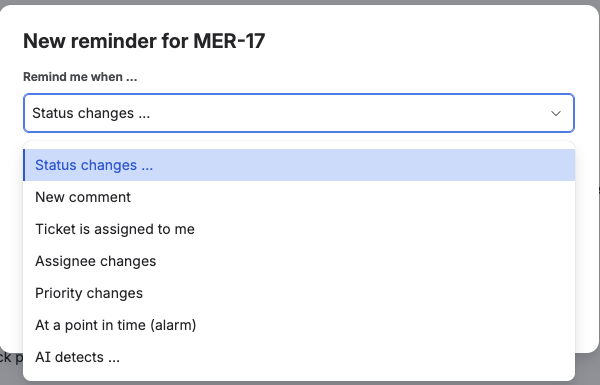
Ticket reminders live where the work happens: on the ticket itself. Open any Jira ticket, find the HeadsUp panel and select + New reminder.

Available triggers
Section titled “Available triggers”| Trigger | Behavior |
|---|---|
| Status changes … | A target status from the ticket’s actual workflow, or any status change |
| New comment | Optionally with a keyword filter: only report when a word such as “escalation” appears (case does not matter) |
| Ticket is assigned to me | Triggers only when the reminder owner becomes the assignee |
| Assignee changes | Any change of the assignee |
| Priority changes | Any priority change |
| At a point in time | Date and time, for example a follow-up on August 15 at 9:00. Can repeat daily, weekly or monthly |
| AI detects … | A condition in plain language, see AI detection |
Repeating a point in time
Section titled “Repeating a point in time”A point-in-time reminder can repeat. Under date and time, Repeat offers Does not repeat, Daily, Weekly on … and Monthly on day …, with the weekday and the day taken from the date you picked, the way a calendar does it.
Three details are worth knowing, because they are where hand-rolled repeats usually go wrong.
- The time stays the time. A reminder set for 9:00 arrives at 9:00 after the clocks change, not at 8:00 or 10:00. HeadsUp stores the time zone of whoever created the reminder and works in that calendar.
- The rhythm follows the date you chose, not the moment of delivery. If an hourly check runs late, the next date is still counted from the original one, so the series does not drift.
- Monthly clamps to the last day of the month. The 31st of January becomes February 28 or 29, and in March it is the 31st again. Every month gets its reminder, and the day you picked is never lost.
A repeating reminder needs an end, so the Expires field appears for it as well.
Comments with restricted visibility
Section titled “Comments with restricted visibility”Comments restricted to a project role never reach HeadsUp, so they do not trigger your reminder. Internal Service Management notes do reach the app and trigger it, but HeadsUp never shows their text and never writes an auto comment for them; AI reminders skip them entirely and use no credit. A project administrator can add the app user to the restricted role, and a role-restricted comment then triggers as well, still without revealing its content. Details in Setup and permissions.
Two options on every reminder
Section titled “Two options on every reminder”- Also post as a comment on the ticket: the notification additionally appears in the ticket’s activity stream. Note that ticket comments are visible to everyone who can read the ticket, not only to the reminder owner.
- Keep active after triggering: the reminder triggers repeatedly (marked ↻ in the list). Without this option it triggers exactly once and is then marked as done (✅).
Expiry date
Section titled “Expiry date”Reminders that trigger more than once can be given an expiry date. The field Expires appears as soon as Keep active after triggering is set, or as soon as a point in time repeats, and offers No expiry, In 2 weeks, In 1 month, In 3 months, In 6 months or a specific date.
No expiry is preselected, so a reminder runs indefinitely unless you choose otherwise.
Seven days before the date, HeadsUp notifies you once so you can extend it. When a reminder expires it is paused, not deleted: it stays in the list marked ⏸, and one click on Extend by 3 months brings it back.
Reading the list
Section titled “Reading the list”| Icon | Meaning |
|---|---|
| 🔼 | Active, waiting for the event |
| ✅ | Already triggered (one-time reminders) |
| ⏸ | Paused: expired, the owner’s account was deactivated, or the target issue is unavailable |
| 💬 | Also posts a ticket comment |
| ↻ | Triggers more than once, either repeatedly on an event or on a repeating date |
Active reminders with an expiry date show that date below the entry, paused ones show the reason. Target issue unavailable appears when a delivery no longer finds the ticket, because it was deleted, moved or is no longer visible to the app. The entry then adds the note “Reactivate only once the issue is reachable again, otherwise the next delivery pauses the reminder right away.”
Edit opens the same dialog again, filled in with what was saved, so a wrong time or a mistyped keyword costs one correction instead of a fresh reminder. Everything can be changed, including the trigger type itself. A reminder that had already triggered becomes active again when it is edited, because that is plainly what was meant. Edit sits in both places, in the panel on the ticket and on the overview page, and both open the same dialog. Filter alerts have no edit at all, see filter alerts.
Reminders can be deleted at any time. Every user sees only their own reminders; this is also enforced on the server side.
The log of a reminder
Section titled “The log of a reminder”Below every reminder there is Show log. It expands what HeadsUp has recorded for that reminder, in the panel on the ticket as well as on the overview page. The entries are fetched on the first expand, so a long list stays fast.
Every entry names the decision in plain words, the ticket it was about, and the time. Where a reasoning was stored it appears underneath; for AI entries that is the model’s own sentence together with the model name. As long as nothing has happened, the log says “Nothing logged yet. Entries appear as soon as this reminder is checked or triggered.”
Which decisions a log can hold is listed under Notifications and inbox.
Timer precision
Section titled “Timer precision”Time-based reminders work on an hourly grid. The notification can arrive up to about one hour after the chosen time. For a repeating reminder that delay applies to the single occurrence only; the next date is counted from the date you chose, so the series keeps its time.