
Filter alerts
A filter alert watches a whole ticket set instead of a single ticket. The scope is defined by a JQL query or a saved Jira filter: “any ticket in project X”, “all critical bugs”, “every request in my queue”.
Filter alerts are created on the HeadsUp overview page: Apps → HeadsUp → + New filter alert.
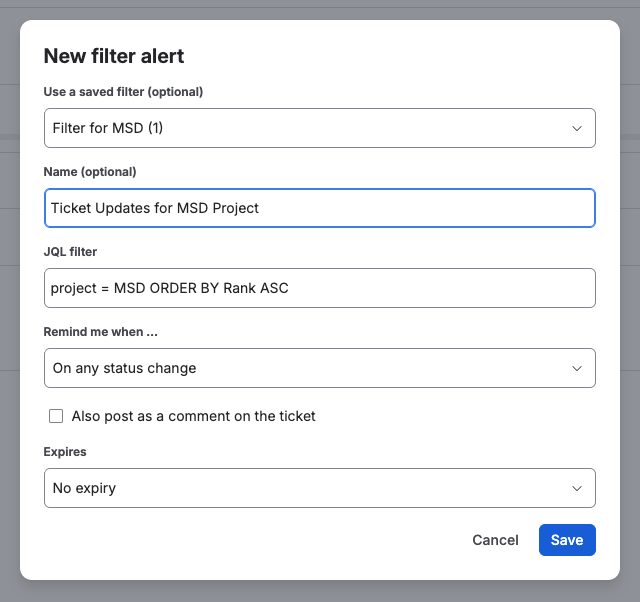
Creating a filter alert
Section titled “Creating a filter alert”- Choose the scope. The easiest way is the dropdown “Use a saved filter (optional)”: it lists the user’s Jira filters and copies the JQL, which stays editable. Entering JQL directly works as well; it is validated on save.
- Choose the trigger:
- New ticket appears in the filter, for example every new bug in project X
- Status change (any or a target status), new comment, priority change, assignee change
- AI detects …, a plain-language condition evaluated across all tickets in the filter, see AI detection
- SLA about to breach, see below
- Optionally give it a name. The name appears in the email subject in square brackets, so the source of a notification is clear at a glance.
Filter alerts stay active permanently until deleted.
Expiry date
Section titled “Expiry date”Filter alerts always run permanently, so they can be given an expiry date. The field Expires offers No expiry, In 2 weeks, In 1 month, In 3 months, In 6 months or a specific date. No expiry is preselected.
This matters most for AI detection: a forgotten alert keeps consuming the shared AI Credits of the site. An expiry date ends that without anyone having to remember.
Seven days before the date you get a reminder so you can extend it. An expired alert is paused, not deleted, and one click brings it back.
SLA early warning (Advanced edition)
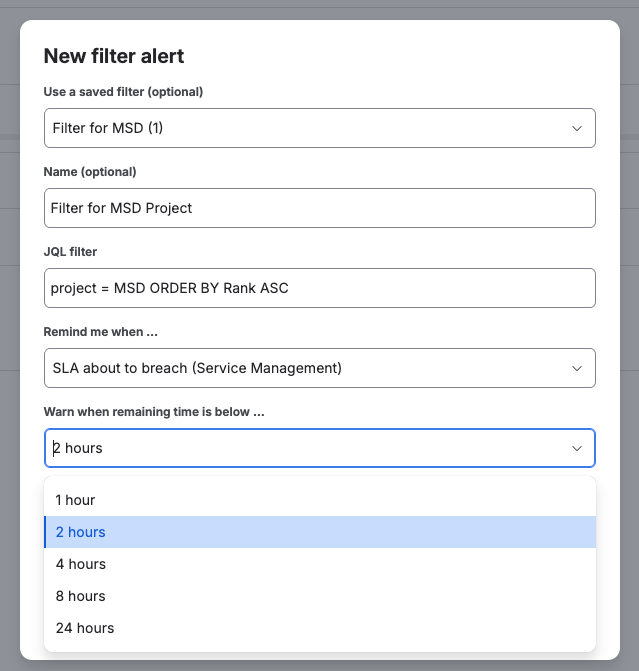
Section titled “SLA early warning (Advanced edition)”For Jira Service Management, a filter alert can warn before an SLA breaches: choose the trigger “SLA about to breach” and a threshold (1, 2, 4, 8 or 24 hours). HeadsUp checks open requests hourly and reports each request exactly once per alert, so an approaching breach does not turn into hourly spam. Per run an alert checks the first 50 open requests of its filter. A queue with more open requests than that is better split across several alerts, for example by project or by priority.
This trigger is part of the Advanced edition. In the Standard edition it does not appear in the trigger list.
Two cases stay quiet on purpose. A paused SLA sends no warning, because the clock is not running while a request waits on the customer, and the warning still arrives once it resumes. A breach that has already happened sends no warning either, because an early warning after the fact is not one.
The log of a filter alert
Section titled “The log of a filter alert”Below every filter alert on the overview page there is Show log as well. Expanded, it shows what the alert did: triggered and delivered, evaluated by the AI, or that Jira rejected the JQL or the SLA data could not be read. The entries are fetched on the first expand. The list of possible entries is under Notifications and inbox.
Changing and deleting
Section titled “Changing and deleting”A filter alert cannot be edited. The overview page offers only Delete for it, and the server rejects a change as well. To change the JQL, the trigger or the name, delete the alert and create it again; the JQL of a saved filter is a snapshot anyway. Ticket reminders are different, they can be edited in the panel on the ticket as well as on the overview page.
Precision
Section titled “Precision”Filter alerts on events (status, comment, priority, assignee, new ticket) react within seconds. The SLA check runs hourly; a warning can arrive up to about one hour after the remaining time falls below the threshold.