
Notifications and inbox
Notifications arrive through Jira’s regular mail delivery. The subject line follows this pattern:
🔼 HeadsUp PROJ-123: what happened [filter alert name]Emails are sent in the reminder owner’s Atlassian profile language (English, German, Spanish or French, with English as fallback).
The built-in inbox
Section titled “The built-in inbox”Every notification also lands in the inbox on the HeadsUp overview page, so nothing depends on the mailbox alone. The way there leads through Apps in the top navigation, then HeadsUp, then the Notifications tab. Unread entries are highlighted; they can be marked as read individually or all at once. The list holds the 25 most recent entries; older notifications are no longer shown.
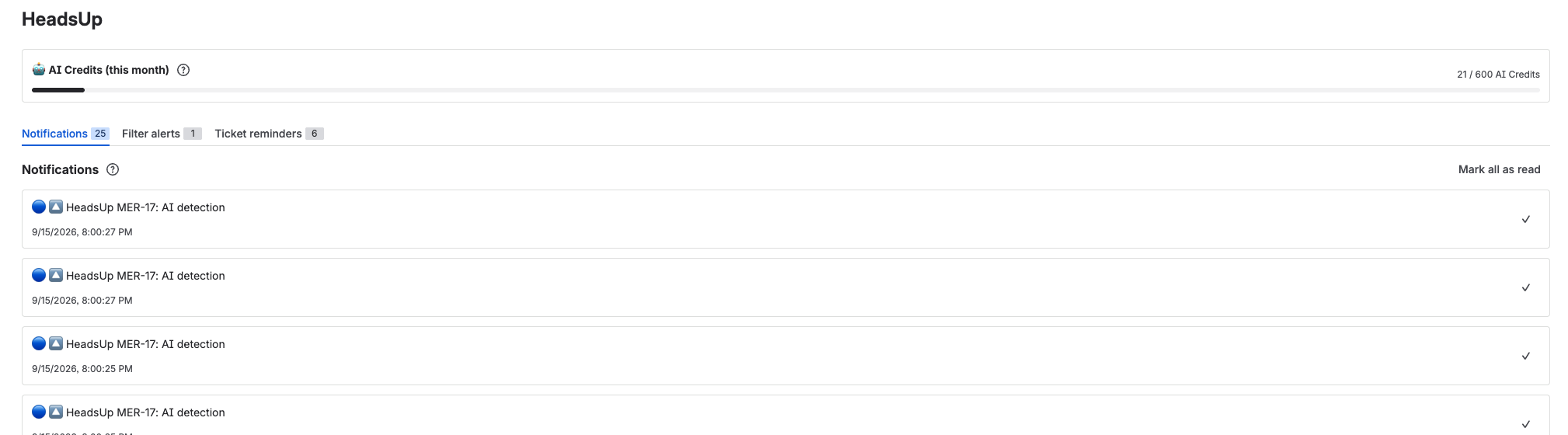
HeadsUp notifications do not appear in Atlassian’s own notification bell. A Forge app cannot place anything there.
Optional: comment on the ticket
Section titled “Optional: comment on the ticket”Each reminder can additionally post its notification as a comment on the ticket (“Also post as a comment on the ticket”). This makes the event visible to the whole team in the activity stream.
Comments restricted to a project role never reach HeadsUp, so they do not trigger your reminder. Internal Service Management notes do reach the app and trigger it, but HeadsUp never shows their text and never writes an auto comment for them; AI reminders skip them entirely and use no credit. A project administrator can add the app user to the restricted role, and a role-restricted comment then triggers as well, still without revealing its content. Details in Setup and permissions.
The log of each reminder
Section titled “The log of each reminder”Every reminder and every filter alert keeps its own log, the audit log. It sits below the entry behind Show log, in the HeadsUp panel on the ticket as well as on the overview page. It is fetched on the first expand, so a long list stays fast. Only your own reminders are visible, and for entries about a ticket only the tickets you are allowed to see.
An entry consists of the decision in plain words, the ticket if one belongs to it, the time, and the stored reasoning where there is one. For AI decisions that reasoning is the sentence of the model plus the model name. The other reasons come from the machinery, a Jira error message for example, and appear the way they were recorded.
A log can hold these 16 decisions, ordered by delivery, AI check, pausing, and errors in a query.
| Entry | What it means |
|---|---|
| Triggered and delivered | The reminder fired and every chosen channel delivered. |
| Triggered, one delivery channel failed | It fired, but the email or the ticket comment did not get through. |
| Email could not be sent | Jira’s mail delivery rejected the notification. |
| Comment could not be posted on the ticket | The optional auto comment failed, for example because a permission is missing. |
| Comment skipped, the comment that triggered it has restricted visibility | No auto comment was written on purpose, so the content does not become visible through the ticket. |
| AI found a match | The condition applied and the notification went out. |
| AI found no match | Evaluated and denied, so the silence was intended. |
| AI check failed | The model was unreachable or returned nothing usable. |
| AI Credits used up, check skipped | The monthly pool of the site was empty, see AI detection. |
| AI check skipped, the comment has restricted visibility | The text reaches no model and no credit is used. |
| Target ticket unreachable, reminder paused | The ticket was deleted, moved or is no longer visible to the app. |
| Expiry date reached, reminder paused | The expiry date has passed; Extend by 3 months brings the reminder back. |
| Owner account deactivated, reminder paused | The daily run found a deactivated Jira account. |
| Jira rejected the JQL filter | The stored JQL is no longer valid, for example because a field or a project is gone. |
| SLA data could not be read | The SLA early warning could not read the data of a request. |
| SLA check failed | The hourly SLA run ended in an error. |
Managing personal data
Section titled “Managing personal data”The overview page lists all of the user’s reminders and filter alerts. Ticket reminders can be edited there, filter alerts cannot; for them it stays at deleting and creating a new one. Individual entries can be deleted anytime; the button “Delete all my reminders” removes everything at once after a confirmation click, including the inbox entries and the audit history. Every user sees and manages only their own reminders.